Siemens PLM’s Solid Edge team is sponsoring another great challenge hosted by GrabCAD! This is your chance to trick out the Razor Crazy Cart by Razor USA to showcase your creativity, quality of design and design thinking. Simply download models, start designing, create a render and animation using Solid Edge and KeyShot, and submit it online.
If you are not a current Solid Edge user, start your 45 day trial here for your opportunity to win!
If you currently use Solid Edge, but want to show off your design with KeyShot’s amazing photo-realistic rendering capabilities, start your trial of KeyShot here.
You could win a Microsoft Surface Pro 3, a subscription of Solid Edge
Premium with KeyShot Pro and Animation and a Razor Crazy Cart! Click
here to view the details and submit your design today!
In celebration of Halloween, I thought a Jack-O-Lantern would be fun to replicate in Solid Edge ST7 and to compliment the design, a cool render from Keyshot.
The first phase of my pumpkin creation resided around the creation of easily synchronous sketched curves to dictate the size of the pumpkin. Synchronous made this step easy using the steering wheel and patterning to replicate and modify the sketches.
Next I used Blue Surfing to bring the edges together and inserted sketches along the way - eventually resulting in a solid body shown in the image below. Watch the video below this creation in real time.
Once I had a solid body, which made up the Jack-O-Lantern body, the following parts were very easy to create. Using a part and doing a Multi Body design made it easy to create the top for the lantern.
After all the parts were designed and published to an assembly, all the rendering fun starts in KeyShot! After having sent the Solid Edge model to Keyshot, spending a few minutes of adding lights, an iron bumpmap, and adjusting a few artistic settings such as view focus and setting vignette strength, its time for a render.
Close up of Iron bumpmap on SE color vs standard SE color alone.
Have some fun and share your Halloween designs in a comment below. Happy rendering!
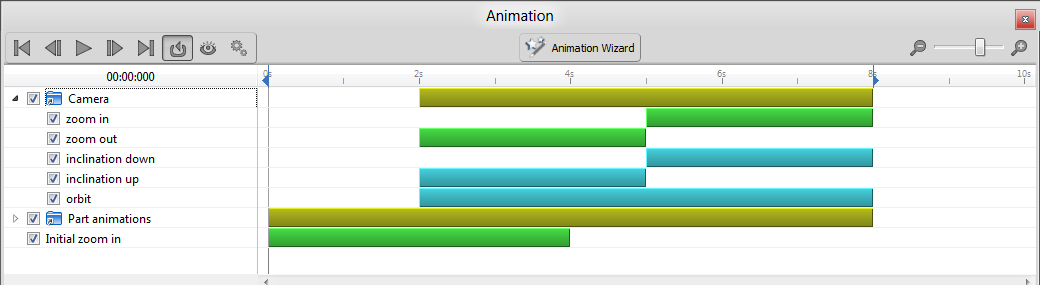
Rendering and animating in Solid Edge has never been easier thanks to the complete integration of KeyShot into Solid Edge ST7. Solid Edge has always had descent rendering, but it was graphic card based; however, the application could be slow when rendering especially when animating high end renders which could takes a few days create.
Animating and rendering your CAD models with Solid Edge takes a fraction of the time utilizing a blazing fast CPU rendering engine of KeyShot. Though, using KeyShot alone lacks the finesse of Solid Edge’s animation abilities. Thanks to the integration of the two software applications, designers now have an extremely fast and an easy to animate tool!
Swoosh Technologies’ Application Engineer, Dylan Malek, walks you through creating an animation in utilizing this new integration in Solid Edge ST7 and KeyShot 5. Learn how to create new motors, apply color and textures to renders, and more in the video below.
The final animation:
Learn more about rendering your models in Solid Edge and KeyShot with training from Swoosh Technologies.Contact us today to request a customized course to better visualize your products and increase sales/marketing capabilities.
Show off your creativity and innovation with a design challenge from GrabCAD. Solid Edge, KeyShot, and Razor USA come together to deliver this amazon opportunity. It's simple: just think RADICAL and use your skills and creativity to design a unique three wheel, body powered scooter.
The goal is to design for efficient production and low cost manufacturing. Create your innovative design in Solid Edge, render it inside KeyShot, and upload it to the GrabCAD challenge page. You can be among the 10 entries to win amazing prizes such as cash prizes, licenses of Solid Edge and KeyShot, and a Razor PowerWing Scooter. Get started today!
KeyShot allows users to animate 3D models quickly and easily. Models will be ready for presentations or assembly instructions in minutes. Keyshot does not rely on keyframes, but rather allows users to apply transforms (rotations, translations, etc) to set up new animations at the click of a button.
Check out some of our favorite animations below and get started with a free trial of KeyShot here.
Let’s look at the Live Linking and Plugin capabilities of Keyshot. There are multiple ways to bring geometry into Keyshot for incredibly fast, high quality renders including the import function and direct export for plugin-enabled software such as Solid Edge and SolidWorks. The first time I used Keyshot I excitedly started importing my Solid Edge files but could not get the rounded edges of my parts to not be faceted. After an email and a quick response from the Keyshot support group, it turns out there is a simple solution. All I had to do was download the latest plugin from the KeyShot website here and utilize LiveLinking. After using the plugin for Solid Edge my images went from this:
To This:
Take a look at the following video demonstrating the LiveLinking and plugin for Solid Edge in action.
Check out the final render using Solid Edge and KeyShot:
Swoosh Technologies announces the release of KeyShot 4.2 from Luxion. KeyShot is the first real time ray tracing and global illumination software program. The latest release, 4.2, adds new features to the software and updates the exciting tools that power the rendering and animation process.
KeyShot 4.2 brings faster rendering, better selection and more control over hardware and 3D data import that allows users to work faster and more efficiently without jeopardizing the final quality of their images, animations, and KeyShotVR interactive visuals.
Groups
KeyShot 4.2 introduces the ability to create groups in the Project Scene tree. Users may create new groups, drag and drop parts and sub-assemblies into existing groups and move parts between one group and another. The capability includes a full-featured dialog that allows users to add one or multiple parts to an existing group or create a new group directly from the realtime render interface.
Set Core usage
KeyShot now comes with the ability to set priority on the amount of CPU cores used by KeyShot. Since KeyShot is fully CPU-based and utilizes 100% of all available cores, this ensures users are able to have access to more CPU power in other programs while KeyShot is rendering. This is a simple setting accessed from the KeyShot Preferences with the minimum being four cores.
Material swap
Users can now swap materials between selected parts without having to change the material for each part. Users have two options, swapping materials by selecting parts or by dragging and dropping materials from the KeyShot library onto existing materials in the in-project library.
Scene revisions
KeyShot now offers the ability to save revisions of a scene. When users save a scene, rather than overwriting each scene with the latest settings, they can now save revisions of the same scene, which can then be accessed later from within KeyShot.
Realtime presets
There are now more presets available for the realtime viewer. Through the Project settings, users have an immediate selection of preset options that include actual aspect ratios found in print and digital media. These presets are single-click settings that can also be locked to ensure proper resolution.
Additional updates
Additional updates focus on improvements in five main areas where users have provided valuable input and feedback, updates that include:
Improved render features - faster realtime render mode, transparency for toon material
Improved usability - select objects by material, light/dark interface themes
Improved control - Axalta color tweaker, faster object highlight, improved texture mapping, improved move tool and dynamic sliders, copy HDRI regions and scene tree autoscroll.
Improved animation - New dynamic pivot point and selection of helper objects from the realtime window.
Swoosh Technologies has partnered Luxion to bring customers the latest in 3D rendering technology. Luxion’s KeyShot is a CPU based rendering and animation product for 3D data and has been designed to take the complexity out of rendering photo-realistic images.
KeyShot is easy to use with a very short learning curve. It allows for import of almost any 3D design where users simply drag and drop materials, adjust the lighting, and move the camera. All changes happen in real time and thanks to KeyShot’s advanced rendering technology. This allows for designers to spend more time with creativity than fumbling with technical issues.
“With KeyShot, I feel EMPOWERED! I have a paintbrush and a digital canvas to work with. I have real, artistic-grade paints and I can see the impact of my work instantly. For me, SPEED is key! And KeyShot allows me to demonstrate multiple iterations quickly,” states Time Fehr of Chrysler Corporation.
KeyShot is CPU based and takes full advantage of all cores and threads inside the computer; therefore, does not require special hardware of a graphics card.
Model hierarchy and part and assembly names are maintained upon importing 3D data. KeyShot can handle large files so with no restriction on file size, as long as the computer has enough memory available.
This software is a universal rendering tool for CAD models and supports many popular CAD formats. KeyShot is available as a stand-along product or a plugin for CAD programs, including Siemens PLM NX and Solid Edge, also sold by Swoosh Technologies.
Join Swoosh Technologies’ Application Engineer, Dyaln Malek October 24, 2013 at 2:00 PM CT for a webcast while he showcases KeyShot’s amazing rendering capabilities. Sign up here to join the webcast.